Configuring USB Net on Magewell Pro Convert IP to USB to Fix Network Access Issues After Windows Updates
Magewell IP devices, including Ultra Encode and Pro Convert, support USB Net (a USB-based virtual network interface). This feature is typically used during initial setup or when no network connection is available. Users can connect Magewell encoders or decoders to a computer via USB cable to access the device's web GUI.
In newer versions of Windows 11, the system automatically prioritizes USB-based virtual network interfaces when a new network connection is detected and may attempt to use this interface for data communication in certain scenarios. When a USB Net-enabled device (such as a Magewell device) is connected with this feature activated, the system may recognize this virtual interface as one of the available network paths. As this USB network interface typically does not provide direct internet access, Windows may still attempt to route traffic through it, thereby affecting the user's existing Wi-Fi or wired network connection. This can result in an inability to access the internet or other network connectivity anomalies.
To address this, Magewell introduces a "Disable USB NET" option in the web GUI of Pro Convert IP to USB in the new firmware version 1.0.192. When enabled, the device will no longer establish a network connection via the USB interface, ensuring a stable internet experience.
1. Configuration Steps
- Access the Device: Connect the device to your computer via a USB cable and enter 192.168.66.1 in your browser to access the web GUI.
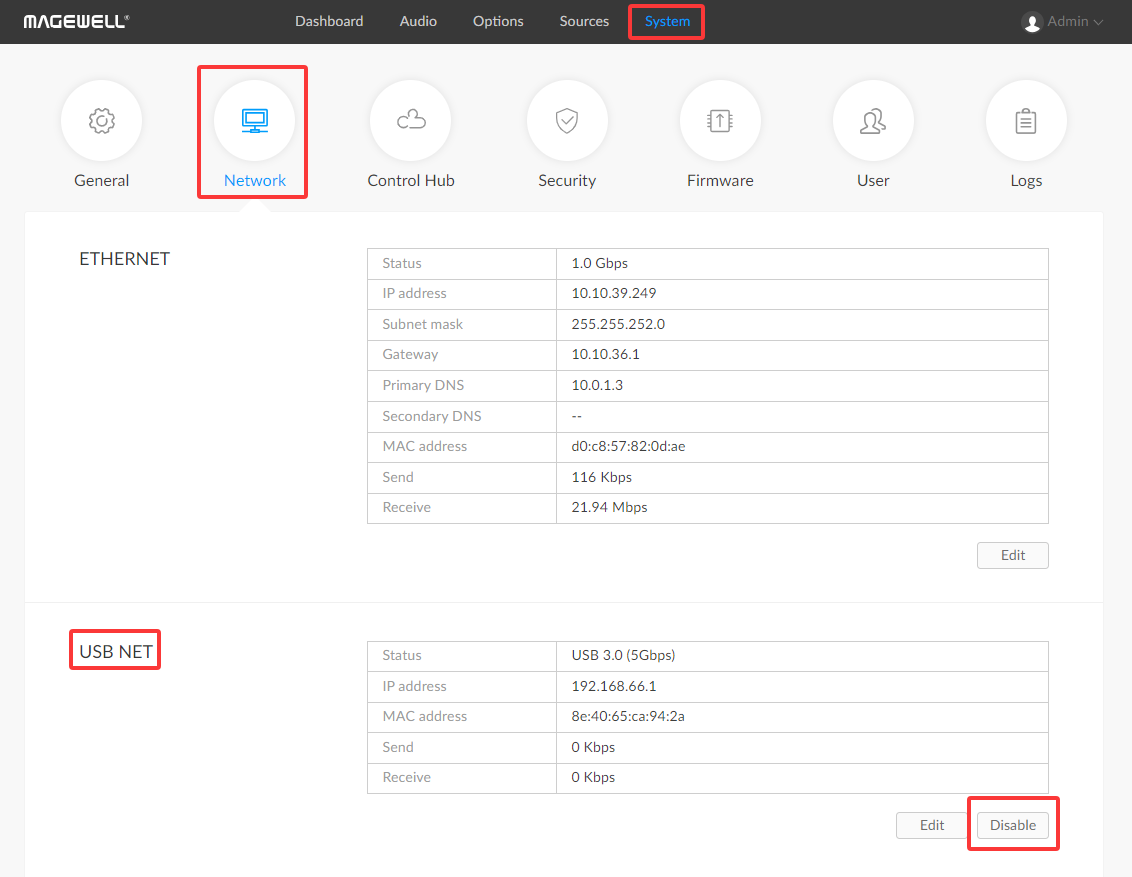
- Disable the Feature: Go to System > Network > USB NET, click "Disable", and save the settings.
- Reconnect: After completing the configuration, unplug and reconnect the USB cable to restart the device.
2. Important: Remember Your Static IP Address
If you have previously configured a static IP address for the device, once USB Net is disabled, you will only be able to access the Web GUI via the Ethernet port using the preset static IP address. The convenient USB access via 192.168.66.1 will no longer be available.
Before disabling the USB Net feature, ensure you have noted the device's pre-configured static IP address (e.g., 192.168.1.100). If this IP address is forgotten, you will be unable to access the device's web GUI over the network and will need to contact Magewell technical support for a factory return reset.