Knowledge Base
 Usb Capture Pro
Content
Usb Capture Pro
Content
Configure Audio Inputs for Zoom Rooms on USB Capture Plus/Pro
Article ID: 0000030001
USB Capture Plus family, USB Capture Pro family


This article describes how to configure audio input selection for USB Capture Plus or USB Capture Pro devices to work with Zoom Rooms using the USB Capture Utility. These models feature 3.5mm audio input/output jacks in addition to HDMI/SDI embedded audio.
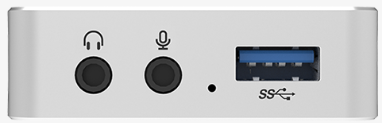 |
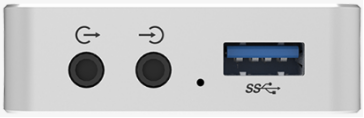 |
|
| 3.5mm audio jack for microphone/headphones | 3.5mm audio jack for Line In/ Line Out |
When a USB Capture Plus/Pro is connected, it exposes three independent audio input sources (Record Devices) to the system:
|
Record Device |
Description |
|
Mic / Line In |
External analog audio signal from the 3.5mm input jack |
|
HDMI / SDI |
Embedded digital audio extracted from the video |
|
Computer |
Audio playback from the host computer |
Starting from Zoom Rooms version 7.2.0, embedded audio that comes with the HDMI/SDI video data is prioritized as the primary input source. If no embedded audio is detected in the video source, the system automatically falls back to the Mic/Line In analog input. Computer playback audio is given the lowest priority.
As audio requirements may vary per room, users can manually select a different input source using the USB Capture Utility tool. Once configured, Zoom Rooms will consistently use the selected audio input until new settings are applied.
Configuration Steps
- Launch USB Capture Utility and confirm that the device is detected.
- Navigate to Advanced→ Audio Control. The Record Device section lists the three audio sources, each with an independent checkbox. By default, all three are checked (Fig.1). Users may specify a preferred record device to avoid potential issues caused by incorrect audio source selection.
- Checked: The audio source is enabled and available as an input
- Unchecked: The audio source is disabled and will not appear in application audio input options
Example (HDMI model): If analog audio input is desired during screen sharing, uncheck HDMI and Computer, leaving only Mic enabled (Fig.2).
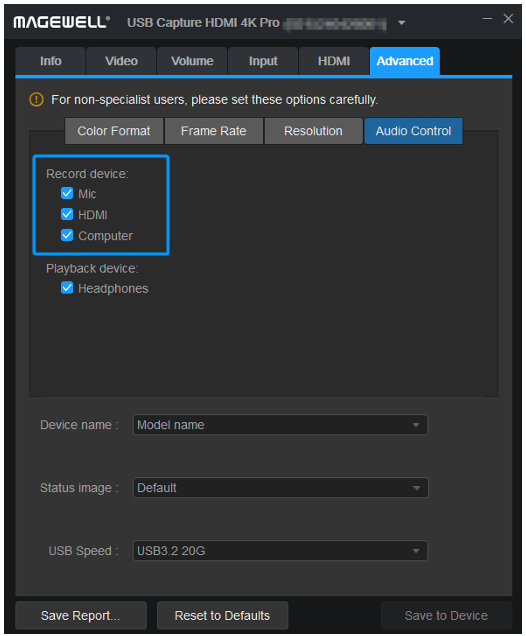
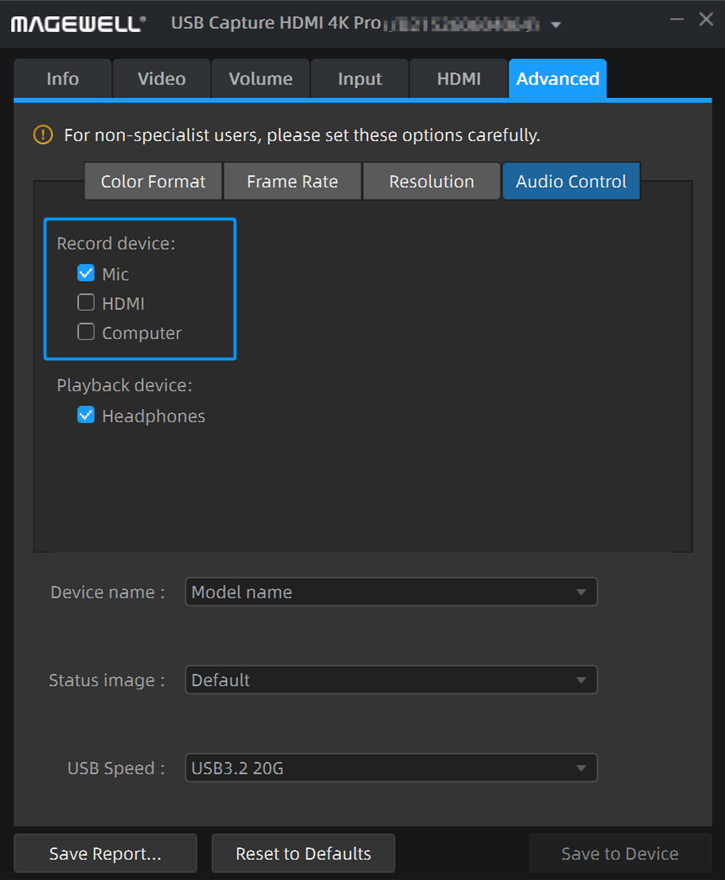
Fig.1 Default selection (all three checked) Fig.2 Customized selection (Mic only)
- After making the selection, click Save to Device, then click Confirm in the pop-up dialog.
- Once the settings are saved, disconnect and reconnect the device for the new audio configuration to take effect.
Note: All configurations are written directly to the device hardware and persist across different computers — no reconfiguration is required when switching hosts.
If you need further assistance, please feel free to contact us.
Has your problem been solved?