The device supports automatic discovery of data sources, or you can manually specify each parameter.
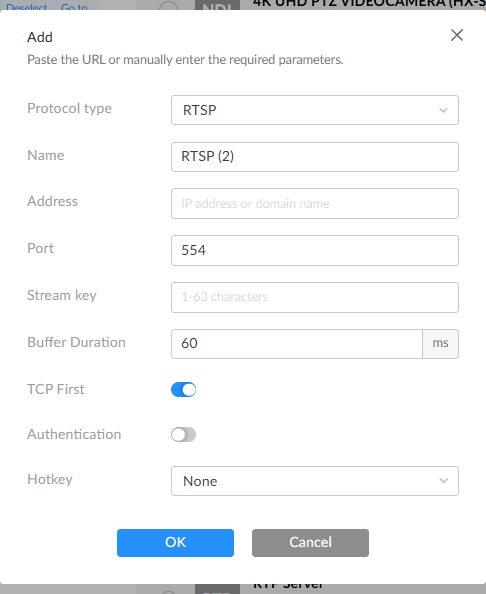
- Protocol Type: Set the protocol type to RTSP.
- Name: Default is RTSP. Specify the task name for easy management when multiple presets are used.
- Address: Enter the RTSP streaming source address or domain name.
- Port: Default is 554. Range: empty or 1-65535.
- Stream Key: Enter the stream password for access authentication. Range: 0 - 127 characters.
- Buffer Duration: Range is 1 ~ 5000ms, default is 60ms. To ensure smooth video output, the buffer time should be greater than the Jitter time displayed in the Dashboard. For tasks requiring low latency, the buffer time can be reduced. Use the default value unless specific needs require changes.
- TCP First: Enabled by default, establishing a reliable TCP connection between the decoder and the RTSP source. Disable this for UDP connections if the network quality is low.
- Authentication: Disabled by default. Enable it to input a username and password for authentication.
- Hotkey: Disabled by default. Once configured, you can quickly switch data sources via keyboard hotkeys connected to the decoder. This feature is disabled if the Profile function is enabled.
- OK: Save the current settings.