Adding NDI streams automatically discovered by the device
![]()
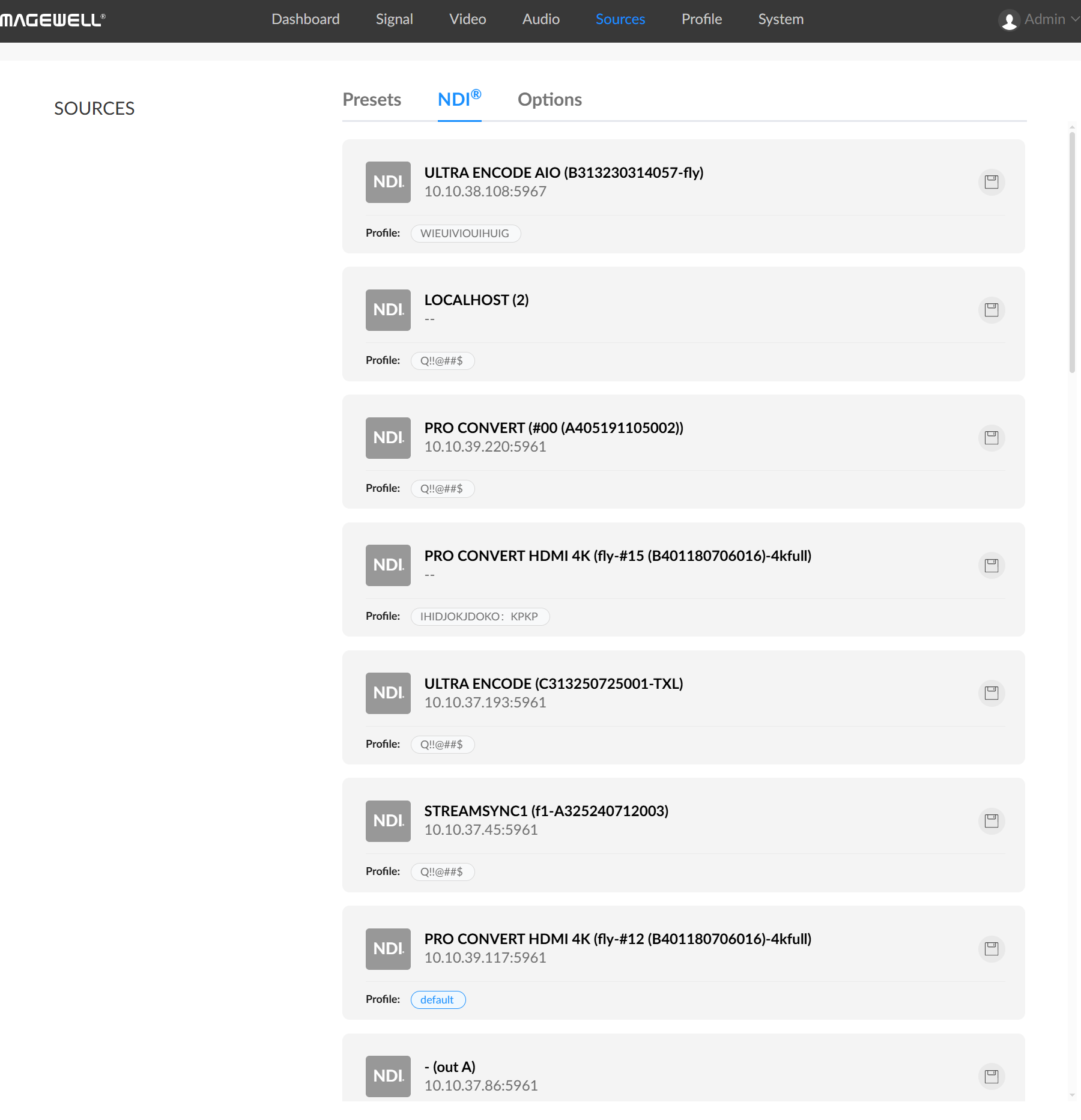
- In the NDI® data source of this tab, select an automatically discovered NDI stream, click
 to add this NDI stream to the Presets tab.
 - The buffer time for automatically discovered NDI data sources is uniformly specified in the "Settings" tab.
- In the NDI® data source of this tab, select an automatically discovered NDI stream, click
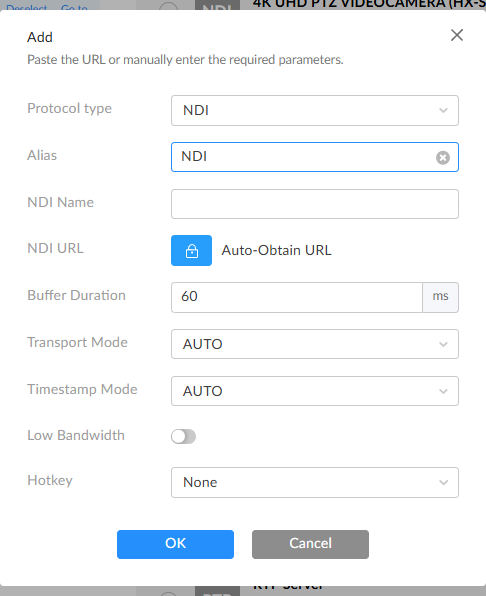
- Adding NDI streams that cannot be automatically discovered by the device but are pingable.
- Alias: Specify the task name for easier management when there are multiple presets.
- NDI Name: Enter the NDI stream name, case-insensitive.
- NDI URL: Enter the NDI stream address in the format "ip-address:port". For example, to decode the NDI stream PRO CONVERT (#00 (A409200420003)) 192.168.1.1:5961, enter 192.168.1.1:5961 here.
Note: You can add an NDI stream by specifying either the NDI Name or NDI Address. If you fill in both, ensure they belong to the same NDI stream.
- Buffer Duration: The value range is 1 ~ 1000 ms, with a default of 60 ms. To ensure smooth video output, it is recommended that the buffer time is longer than the Jitter time displayed in Dashboard. You can reduce the buffer time when the task has high low-latency requirements. Use the default value if there are no special requirements.
- Transport Mode
- "RUDP (Unicast)": Receive audio and video packets via reliable unicast UDP.
- "UDP (Unicast)": Receive audio and video packets via unicast UDP.
- "UDP (Multicast)": Receive audio and video packets via UDP multicast. Click Advanced Settings and specify "Multicast Source Network Segment" for cross-segment multicast transmission.
- "TCP (Multi-connection)": Receive streams via multiple TCP connections.
- "TCP (Single-connection)": Receive streams via a single TCP connection.
- Timestamp Mode: Defaults to Auto, supporting Timecode and Timestamp. It is recommended to use the default value. Contact technical support for configuration suggestions if there are synchronization issues.
- Low Bandwidth: You can turn on this switch when you want to save bandwidth and don't require high video quality. When enabled, it will capture the low-resolution video stream configured on the NDI video source. The actual resolution and quality are defined by the NDI source.
- NDI® Options
After configuration, manually added NDI sources will use the same parameters by default, but you can also modify parameters for each source individually.
![]()
-
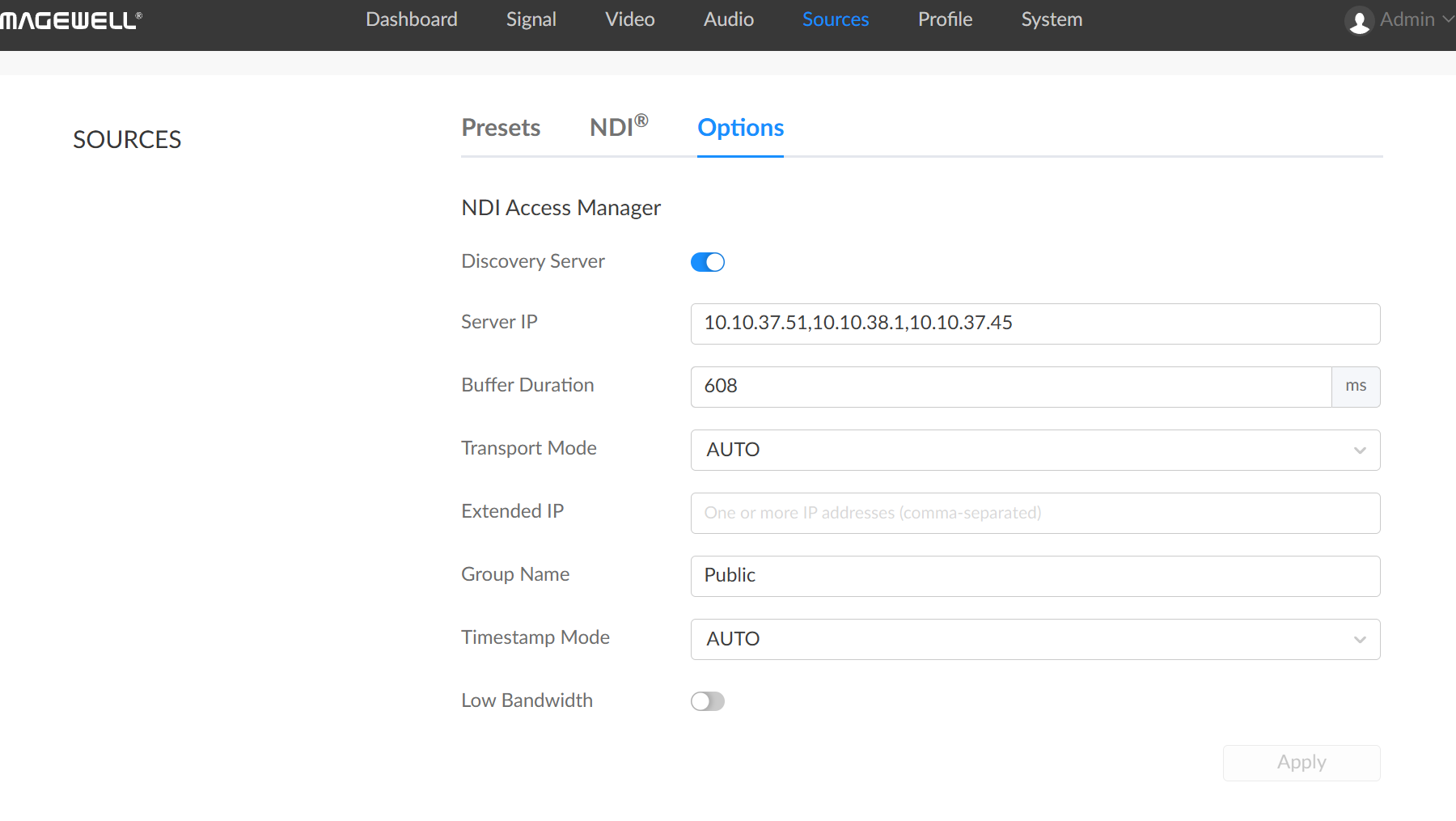
Discovery Service
If the Discovery Server function is enabled, senders and decoders not on the same network segment can also be automatically discovered if they can ping each other.
In this case, set the Server IP Address to the address of the server running the discovery service. By default, this function is disabled.Pro Convert devices have a built-in Discovery Service that starts automatically when powered on, and can be used as a discovery server without additional configuration.
- Server IP Address supports configuring multiple NDI discovery servers, separated by commas.
- Buffer Duration: The value range is 1 ~ 1000 ms, with a default of 60 ms. To ensure smooth video output, it is recommended that the buffer time is longer than the Jitter time displayed in Dashboard. You can reduce the buffer time when the task has high low-latency requirements. Use the default value if there are no special requirements.
- Transport Mode defaults to Auto and supports the following options.
- "RUDP (Unicast)": Receive audio and video packets via reliable unicast UDP.
- "UDP (Unicast)": Receive audio and video packets via unicast UDP.
- "UDP (Multicast)": Receive audio and video packets via UDP multicast. Click Advanced Settings and specify "Multicast Source Network Segment" for cross-segment multicast transmission.
- "TCP (Multi-connection)": Receive streams via multiple TCP connections.
- "TCP (Single-connection)": Receive streams via a single TCP connection.
- Extended IP
Supports configuring multiple IP addresses separated by commas to expand the discovery range of NDI sources.
- Group Name
- Group names are case-insensitive and can contain A-Z, a-z, 0-9, and special characters including _ and -. The decoder supports receiving signals from multiple groups, which can be set as multiple values separated by commas.
- The default group name is Public.
- Timestamp Mode: Defaults to Auto, supporting Timecode and Timestamp. It is recommended to use the default value. Contact technical support for configuration suggestions if there are synchronization issues.
- Low Bandwidth: You can turn on this switch when you want to save bandwidth and don't require high video quality. When enabled, it will capture the low-resolution video stream configured on the NDI video source. The actual resolution and quality are defined by the NDI source.
- Hotkey: No hotkey by default. After configuration, you can quickly switch the currently decoded data source using the keyboard hotkey connected to the decoder. This function becomes invalid when the Profile function is enabled.
-
After completing the settings, click Apply to save the configuration.
-
Discovery Service