Paste an HTTP(S) source URL directly. The device automatically parses and adds the source. Parameters can also be configured manually.
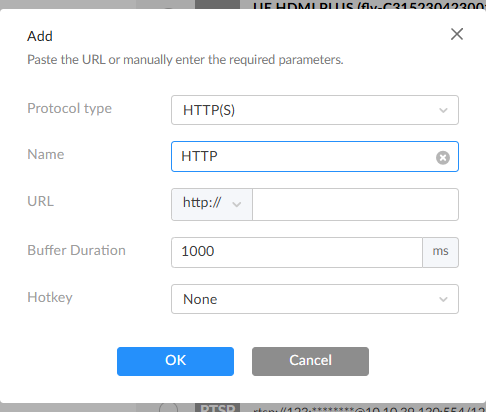
- Protocol Type: Set to HTTP(S).
- Name: Default is HTTP. Specify a task name for easier management.
- URL: Enter the HTTP, HTTPS, or HLS source URL.
-
Buffer Duration: Range 1–5000 ms, default 1000 ms. To ensure smooth video output, it is recommended that the buffer time is longer than the Jitter time displayed in Dashboard. You can reduce the buffer time when the task has high low-latency requirements. Use the default value if there are no special requirements.
To ensure smooth output, it is recommended to set the buffer time greater than the Jitter value shown in Dashboard. - Hotkey No hotkey by default. When configured, a connected keyboard can be used for quick source switching. This function is disabled when Profile is enabled.
- OK: Save the current settings.