- Authorized Info
- Enter the Cloud Settings > License page from the navigation pane.
- Check permissions of Hosted Devices, SRT Relay Server, Stream Conversion and Expiration date.
![]()
- Hosted Devices: the maximum number of devices that can be joined to the Cloud.
- SRT Relay Server: the sum of SRT upload and play streams.
- Stream Conversion: the maximum number of stream conversion tasks to be performed on Cloud. The number is the same as that of inputs.
- Expiration date: the final date on which the current license is valid.
- If the number of hosted devices exceeds the limit of the new license, all devices will be offline. And the units will be online again if devices that exceed the limit of the new license are removed from Cloud.
- If the number of SRT live streams exceeds the limit of the new license, only the new licensed number of streams remains.
- If the number of stream conversion tasks exceeds the limit of the new license, all switches will be off automatically and you can not manually turn the task on. And the tasks will be valid again if conversions exceeded the limit of the new license are removed from Cloud.
Manage Licenses
You can contact your local dealer to buy or renew a license to extend the number of Cloud hosted devices, SRT live streams, and stream
conversion tasks.

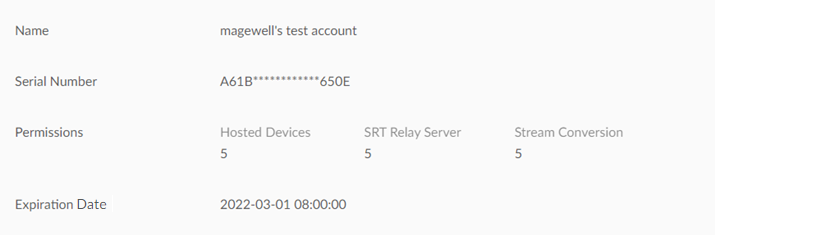
- Registered License
- Enter the Cloud Settings > License page from the navigation pane.
- Check registered licenses including Name, Serial Number,
Permissions and Expiration Date.
Purchase a new license when it expires.
Note that if a license being used is registered to a second Cloud platform, the license will be valid in the second cloud. The previous registered Cloud would go back to use the default license, which might affect its services.
![]()
- Add a license.
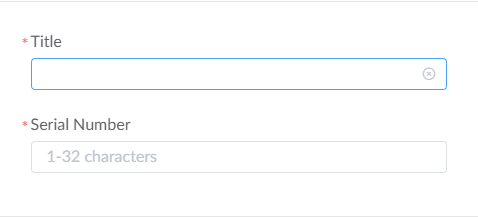
- Click + Add and type in the Name and Serial Number
of license, then click OK.
![]()
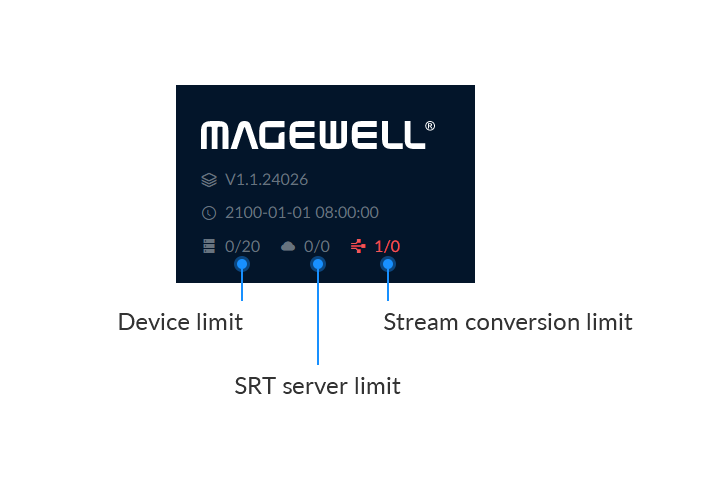
- You can check the current limits at the top left of the Web UI.
![]()
- Click + Add and type in the Name and Serial Number
of license, then click OK.
- Remove a license.
- Click Remove and ensure if you want to delete the license.
Be cautious that if the license is removed, the Cloud functions might be restricted.
- Click Remove and ensure if you want to delete the license.
- Post-processing
- If your license is expired or invalid, please contact your reseller.
- If your license limit has been reached, please reduce the session.